Dev:Related appointment: Difference between revisions
Jump to navigation
Jump to search
No edit summary |
No edit summary |
||
| Line 28: | Line 28: | ||
*** Book is enabled when all mandatory fields are filled in | *** Book is enabled when all mandatory fields are filled in | ||
*** Cancel leaves the page without saving | *** Cancel leaves the page without saving | ||
*** Show validation text whenever user clicks any other link outside this page | *** Show validation text whenever user clicks any other link outside this page[[File:Related appointment.png|left|thumb|770x770px]] | ||
Revision as of 11:48, 22 April 2024
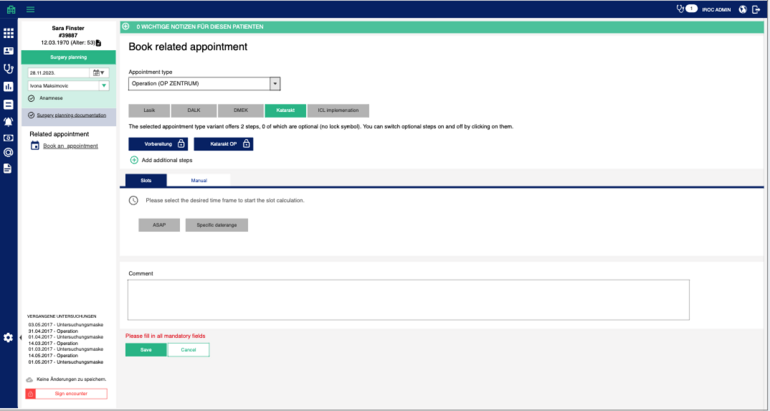
User is able to book related appointment from the side bar of encounter (if that option is administered for that encounter type).
Predefined things which are not visible on UI:
- Patient (preselected from mask)
- Self payer (yes/no) take from patient settings
- Do not block capacity flag (Off / default status)
- Emergency flag (Off / default status)
- Facility default (IROC Augenzentrum)
- Serial appointment (Off / default status)
- Autoanpassung (default status) Visible blocks on UI:
- Appointment type selection
- Appointment type dropdown (list of all active appointment types)
- If appointment type selected show appointment variation options (radio group push button)
- If appointment type variation is selected show steps (checklist multiselect)
- Mandatory steps cannot be unselected and keep the lock icon
- Recommended steps are selected by default, user can unselect them
- Optional steps unselected by default, user can select them
- Additional steps can be added over add additional step link
- Appointment time settings
- Slots
- Show ASAP and Specific time range (push buttons radio group)--> it triggers calculation of AAE on select and offers first available slots for users based on their selection
- Manual
- User is able to select date and time for appointment and time for steps same as on appointments
- Comment text area Book and cancel
- Book is enabled when all mandatory fields are filled in
- Cancel leaves the page without saving
- Show validation text whenever user clicks any other link outside this page
- User is able to select date and time for appointment and time for steps same as on appointments
