Dev:Patient waiting time: Difference between revisions
Jump to navigation
Jump to search
Created page with "Tbd" |
|||
| (6 intermediate revisions by the same user not shown) | |||
| Line 1: | Line 1: | ||
== Patient waiting time report- details == | |||
The Report Page is designed to display the selected report's details and offer users the ability to interact with report inputs, download the report, save it as a template, and manage saved templates. The page includes a left sidebar featuring the report name and two tabs: "Report Inputs" and "Saved Templates." | |||
==== Page Layout ==== | |||
Left Sidebar: | |||
* Positioned on the left side of the page. | |||
* Contains the header displaying the name of the current report. | |||
* Includes two tabs: | |||
** "Report Inputs": For configuring the report parameters. | |||
** "Saved Templates": For managing saved report templates. | |||
* Download Report Button: | |||
** Located at the bottom of the "Report Inputs" section. | |||
** Clicking this button generates the report based on the configured inputs and initiates a download of the report file (always Excel). | |||
Save as a Template Button: | |||
* Positioned below the "Download Report" button. | |||
* Allows users to save the current input configuration as a template for future use. | |||
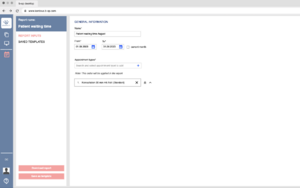
==== Report inputs ==== | |||
* Name, mandatory, free text -Allows users to enter the name to be included in the report. | |||
* Date Picker (From-To), mandatory: | |||
* Enables users to select desired time frame. | |||
* Appointment Types Search Bar- include deactivated appointment types | |||
* Users can search and select appointment types from a predefined list. | |||
* Added Appointment Types Display: | |||
** The selected appointment types are displayed as cards in a draggable list. | |||
** Each card should clearly display the selected appointment type along with the "X" button for removal[[File:Patient waiting time.-report inputs.png|none|thumb]] | |||
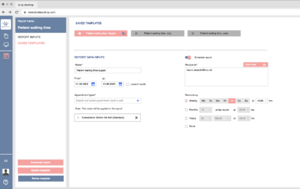
==== Saved templates ==== | |||
Saved templates list: | |||
* Displays a list of saved report templates. | |||
* Each entry includes the template name and potentially a preview of the configured inputs. | |||
* Users can click on an entry to load and edit the template. | |||
* Update template button allows user to update any changes made to chosen report | |||
* Delete template button deletes selected template | |||
Report Data Inputs Section | |||
* Contains input controls for configuring report parameters, similar to the Report Inputs Page. | |||
* Allows users to customize the report by adjusting input values. | |||
Scheduling and sending section | |||
Includes options for scheduling the report sending and adding recipients. | |||
* Enables users to toggle scheduling for report sending. | |||
* When enabled, additional options for scheduling become available. | |||
* Each added email is displayed as a tag with an "X" button for removal. | |||
* Users can select from various recurrency options: weekly, monthly, yearly, or none with specific time for the scheduled report to be sent.[[File:Patient waiting time-saved templates.png|none|thumb]] | |||
==== Functionality ==== | |||
Input Validation | |||
* Implement validation to ensure mandatory fields are filled | |||
* Implement validation to ensure that date ranges are logical | |||
* Implement validation that entered emails are in a proper email format before adding them. | |||
* If user enters any input and tries to exit the page add a popup "You have unsaved work on this page. Leaving now will result in the loss of your changes. Are you sure you want to leave without saving? Yes/No" | |||
{| class="wikitable sortable" | |||
|+ | |||
!KEY | |||
!EN | |||
!DE | |||
|- | |||
| | |||
|Report name | |||
|Bericht Name | |||
|- | |||
| | |||
|Patient waiting time | |||
|Wartezeit der Patienten | |||
|- | |||
| | |||
|This report provides a detailed analysis of patient waiting times at various stages within the appointment process, offering insights into efficiency and opportunities for optimization. | |||
|Dieser Bericht enthält eine detaillierte Analyse der Wartezeiten von Patienten in verschiedenen Phasen des Terminvergabeprozesses und bietet Einblicke in die Effizienz und Optimierungsmöglichkeiten. | |||
|- | |||
| | |||
|Report Inputs | |||
|Bericht Eingaben | |||
|- | |||
| | |||
|Saved templates | |||
|Gespeicherte Vorlagen | |||
|- | |||
| | |||
|Download report | |||
|Bericht herunterladen | |||
|- | |||
| | |||
|Save as template | |||
|Als Vorlage speichern | |||
|- | |||
| | |||
|General information | |||
|Allgemeine Informationen | |||
|- | |||
| | |||
|Name | |||
|Name | |||
|- | |||
| | |||
|From | |||
|Vom | |||
|- | |||
| | |||
|To | |||
|Zu | |||
|- | |||
| | |||
|Appointment types | |||
|Terminarten | |||
|- | |||
| | |||
|From | |||
|Vom | |||
|- | |||
| | |||
|To | |||
|Zu | |||
|- | |||
| | |||
|''Note: This order will be applied in the report'' | |||
|Hinweis: Diese Reihenfolge wird in den Bericht übernommen | |||
|- | |||
| | |||
|Update template | |||
|Vorlage aktualisieren | |||
|- | |||
| | |||
|Delete template | |||
|Vorlage löschen | |||
|- | |||
| | |||
|Report data inputs | |||
|Dateneingaben melden | |||
|- | |||
| | |||
|current month | |||
|aktueller Monat | |||
|- | |||
| | |||
|Schedule report | |||
|Zeitplan Bericht | |||
|- | |||
| | |||
|Recipients | |||
|Empfänger | |||
|- | |||
| | |||
|Send now | |||
|Jetzt abschicken | |||
|- | |||
| | |||
|Reccurency | |||
|Rekultivierung | |||
|- | |||
| | |||
|Weekly | |||
|Wöchentlich | |||
|- | |||
| | |||
|Mo, Tu, We, Th, Fr, Sa, Su | |||
|Mo, Di, Mi, Do, Fr, Sa, So | |||
|- | |||
| | |||
|at | |||
|auf | |||
|- | |||
| | |||
|hrs | |||
|Std | |||
|- | |||
| | |||
|Monthly | |||
|Monatlich | |||
|- | |||
| | |||
|of the month | |||
|des Monats | |||
|- | |||
| | |||
|Yearly | |||
|Jährlich | |||
|- | |||
| | |||
|None | |||
|Keine | |||
|} | |||
* | |||
Latest revision as of 09:08, 6 October 2023
Patient waiting time report- details
The Report Page is designed to display the selected report's details and offer users the ability to interact with report inputs, download the report, save it as a template, and manage saved templates. The page includes a left sidebar featuring the report name and two tabs: "Report Inputs" and "Saved Templates."
Page Layout
Left Sidebar:
- Positioned on the left side of the page.
- Contains the header displaying the name of the current report.
- Includes two tabs:
- "Report Inputs": For configuring the report parameters.
- "Saved Templates": For managing saved report templates.
- Download Report Button:
- Located at the bottom of the "Report Inputs" section.
- Clicking this button generates the report based on the configured inputs and initiates a download of the report file (always Excel).
Save as a Template Button:
- Positioned below the "Download Report" button.
- Allows users to save the current input configuration as a template for future use.
Report inputs
- Name, mandatory, free text -Allows users to enter the name to be included in the report.
- Date Picker (From-To), mandatory:
- Enables users to select desired time frame.
- Appointment Types Search Bar- include deactivated appointment types
- Users can search and select appointment types from a predefined list.
- Added Appointment Types Display:
- The selected appointment types are displayed as cards in a draggable list.
- Each card should clearly display the selected appointment type along with the "X" button for removal

Saved templates
Saved templates list:
- Displays a list of saved report templates.
- Each entry includes the template name and potentially a preview of the configured inputs.
- Users can click on an entry to load and edit the template.
- Update template button allows user to update any changes made to chosen report
- Delete template button deletes selected template
Report Data Inputs Section
- Contains input controls for configuring report parameters, similar to the Report Inputs Page.
- Allows users to customize the report by adjusting input values.
Scheduling and sending section
Includes options for scheduling the report sending and adding recipients.
- Enables users to toggle scheduling for report sending.
- When enabled, additional options for scheduling become available.
- Each added email is displayed as a tag with an "X" button for removal.
- Users can select from various recurrency options: weekly, monthly, yearly, or none with specific time for the scheduled report to be sent.

Functionality
Input Validation
- Implement validation to ensure mandatory fields are filled
- Implement validation to ensure that date ranges are logical
- Implement validation that entered emails are in a proper email format before adding them.
- If user enters any input and tries to exit the page add a popup "You have unsaved work on this page. Leaving now will result in the loss of your changes. Are you sure you want to leave without saving? Yes/No"
| KEY | EN | DE |
|---|---|---|
| Report name | Bericht Name | |
| Patient waiting time | Wartezeit der Patienten | |
| This report provides a detailed analysis of patient waiting times at various stages within the appointment process, offering insights into efficiency and opportunities for optimization. | Dieser Bericht enthält eine detaillierte Analyse der Wartezeiten von Patienten in verschiedenen Phasen des Terminvergabeprozesses und bietet Einblicke in die Effizienz und Optimierungsmöglichkeiten. | |
| Report Inputs | Bericht Eingaben | |
| Saved templates | Gespeicherte Vorlagen | |
| Download report | Bericht herunterladen | |
| Save as template | Als Vorlage speichern | |
| General information | Allgemeine Informationen | |
| Name | Name | |
| From | Vom | |
| To | Zu | |
| Appointment types | Terminarten | |
| From | Vom | |
| To | Zu | |
| Note: This order will be applied in the report | Hinweis: Diese Reihenfolge wird in den Bericht übernommen | |
| Update template | Vorlage aktualisieren | |
| Delete template | Vorlage löschen | |
| Report data inputs | Dateneingaben melden | |
| current month | aktueller Monat | |
| Schedule report | Zeitplan Bericht | |
| Recipients | Empfänger | |
| Send now | Jetzt abschicken | |
| Reccurency | Rekultivierung | |
| Weekly | Wöchentlich | |
| Mo, Tu, We, Th, Fr, Sa, Su | Mo, Di, Mi, Do, Fr, Sa, So | |
| at | auf | |
| hrs | Std | |
| Monthly | Monatlich | |
| of the month | des Monats | |
| Yearly | Jährlich | |
| None | Keine |